 Skeday
Last updated November 3, 2026
Weekly employee schedule template
Download the filled weekly template
This example uses a fictional salon week. Download the schedule as a one-page PDF, edit the Excel file, or make a copy in Google Sheets. No account or email is required.
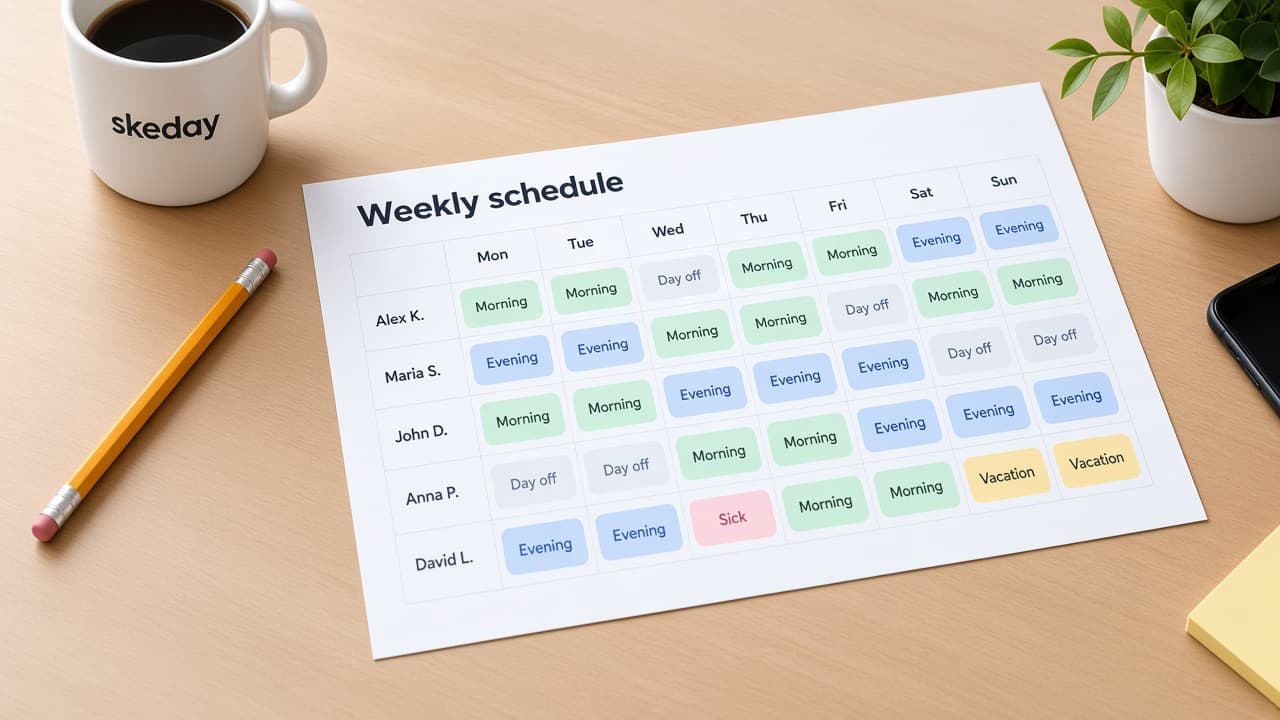
A weekly employee schedule template gives you a starting point for the next seven days. This example lists four fictional salon employees, their roles, Day and Late shifts, and the days they are off. Use the file as a reference, change the names and hours, or build the week in the browser.
The PDF is ready to print. The Excel workbook is editable. The Google Sheets link opens a matching copy so you can adapt it without changing the shared original. The sample is a starting point, not a staffing rule.
What is in this weekly schedule template?
The example is for Northside Salon, with Alex, Maria, John, and Anna. Alex, Maria, and John are stylists. Anna works the front desk. The schedule uses two shifts:
- Day, 09:00–17:00.
- Late, 11:00–19:00.
Each person has working shifts and marked days off from Monday, November 2, through Sunday, November 8, 2026. The names are synthetic and use surname initials. Replace them with your team before you share the schedule. The same layout can work for a cafe, shop, restaurant, or another shift-based team when you change the roles and shifts.
Choose the file for your team
Use the PDF when the schedule belongs on a wall or noticeboard. It contains the company name, week, people, roles, shifts, days off, and the watermark. It does not contain this guide or a form.
Use the Excel file when you want to edit cells, add people, or change the shift names. It is a simple filled example, not an automatic scheduler. The Google Sheets copy contains the same rows and entries in a browser spreadsheet.
Edit the Excel schedule
Open the workbook and replace the sample company name, people, roles, dates, and shifts. Keep the shift legend beside the grid so someone reading the file knows what Day and Late mean. Mark a day off directly in the cell instead of hiding it in a note.
The workbook is a file you control. It does not publish a live link, notify employees, check coverage, calculate payroll, or assign shifts. Save a new copy when the week is ready, and tell the team which file is current if you continue with Excel.
Make a copy in Google Sheets
The Google Sheets button opens a view-only source with the same Northside Salon example. Choose Make a copy before editing. Your copy belongs to your Google account, and the original sample stays unchanged.
Google Sheets is useful when several managers need to edit one workbook. Decide who can edit it, keep one current version, and check sharing settings before adding employee names. A Google Sheets copy is still a spreadsheet: it does not become a published schedule link or add employee logins.
What this template does not do
This template gives you a filled week to edit; it does not build coverage, check employment rules, track attendance, run payroll, collect swaps, send notifications, or publish the current schedule.
From the template to one current schedule
Start with the sample only when its layout helps. Replace the fictional names, define the shifts your team actually uses, and check every day for cover and time off. If the week will stay in a file, save it where the team knows to look.
If you want the same address to show the latest published week, use the maker or workspace instead. The manager controls the draft and publishes the version the team should follow. A template is the starting point; the published schedule is the current answer.
Weekly employee schedule template questions
Can I download this weekly schedule template without an account?
Yes. Download the PDF or Excel file directly. The Google Sheets button opens a view-only source where you can make your own copy.
Can I edit the employee schedule template?
Yes. Edit the Excel file or make a copy in Google Sheets, then replace the fictional names, roles, dates, and shifts.
Is this a Google Sheets employee schedule template?
Yes. The page links to a matching view-only Google Sheet. Choose Make a copy before editing so the shared source stays unchanged.
Does the template publish a live schedule for employees?
No. It is a file example. Use the workspace when you need one published read-only link that employees can open without an account.