 Skeday
Last updated October 3, 2026
How to make a weekly employee schedule
How to make a weekly employee schedule is a short sequence: who can work, which shifts repeat, and which days moved. A small frontline business can keep that sequence in one place and publish the week when it is finished. The steps below follow that order for a single team. They are not a payroll export or an automatic scheduler.
List the people
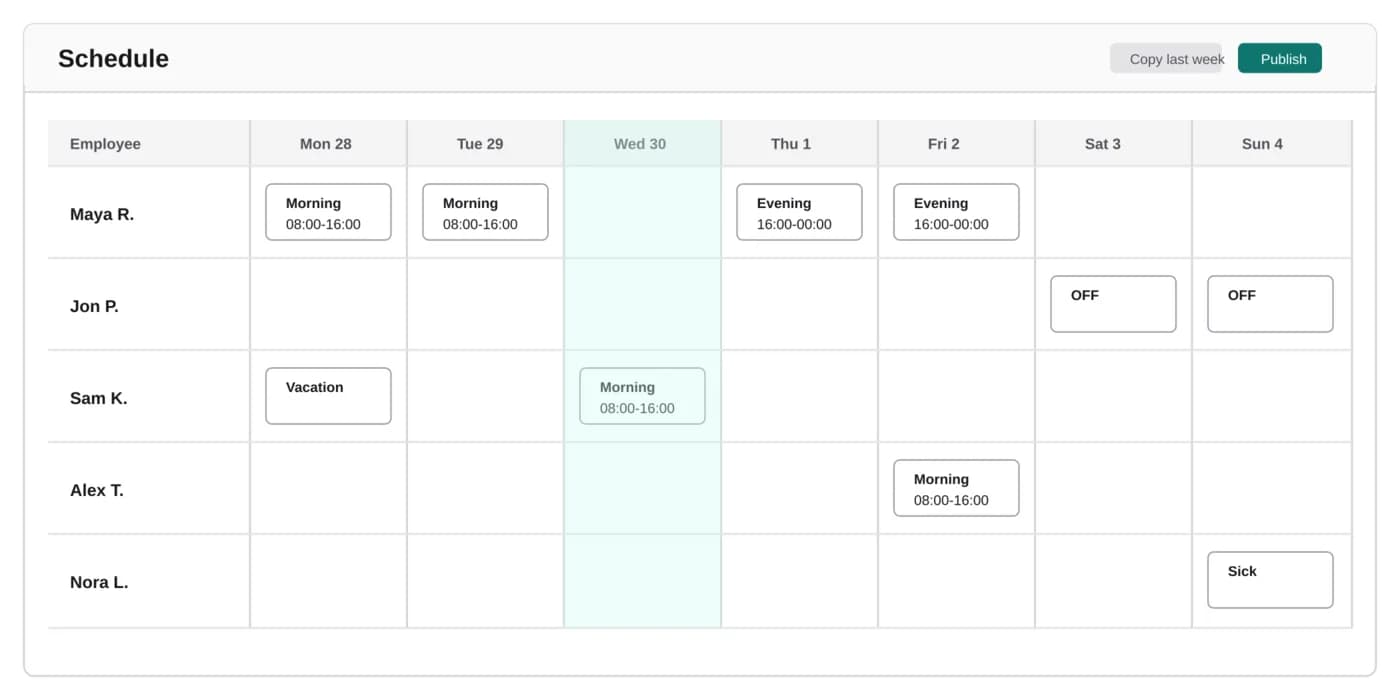
Write down everyone who can appear on the week. In Skeday those people are employees on the company, and a company can have up to 50 active names. You add them once. Later weeks reuse the same list, so Monday does not start by rebuilding a header row. Use the names the team expects to see. On the public page, a person shows as a first name and a surname initial unless a company setting turns on full surnames for the next publish.
Add the shifts you repeat
Most weeks reuse the same blocks, such as a morning, an evening, or a day off. Add those shifts once, with the hours they mean. Filling a day is then a choice from that list. Time off, vacation, and sick time are entries on that day, so the week does not depend on a color only you remember. The first setup is the long part. The weeks after it stay short.
Copy last week
After the first week exists, the next one should start from it. Copy last week, then look for the days that actually moved. Duplicating a spreadsheet tab is how a stale total or last month's shift survives into the new week. Copying the previous week keeps the pattern and leaves the edits in front of you.
Change only the days that moved
A swapped shift or a day off is a small edit on that day. Leave the rest of the week alone. Those edits can stay in a draft, and the team does not see the draft. Publish when the week is the one you want them to follow, not while Tuesday is still moving.
Publish one current week
Publishing makes that week the schedule people can open. The same link shows the update the next time you publish, so you do not send a new file. You can also download a PDF for the wall, with a QR code that opens the public page. If the week still lives in a spreadsheet, compare that routine with an employee schedule instead of Excel. The price is $5 per month for the company after a 14-day trial, and the trial does not ask for a card.